Manage Note Goal Choices (Picklist)
Therapist Notes: Accessing the Picklist
1. Select the pen/paper icon on a note within the Details tab to access the picklist
2. The Picklist interface will appear
Once in the Picklist
A. Click on "New Option" for a shortcut to add new text options to the picklist if needed.
1. Select the category
A. Click on "New Option" for a shortcut to add new text options to the picklist if needed.
1. Select the category
2. Click on the text
3. Click Insert
3. Click Insert
Managing the Pick List: Where to go?
1. Users will be able to manage their picklist under Documentation-> Manage Note Goal Choices
Creating a Category
A. If users plan on creating a large amount of picklist options, it is best to avoid the "All" Category and create a category as it may cause confusion when trying to search for your options when doing documentation
1. Select the Patient Type->Document Type ->Goal Type
1. Select the Patient Type->Document Type ->Goal Type
2. Create or Edit a Category
Creating Picklist Options
1. Select the Patient Type->Document Type ->Section->Field->Category.
2. Click on Edit to update an existing option or click on New to add a option
My List: Setting up a Pick List for individual Users
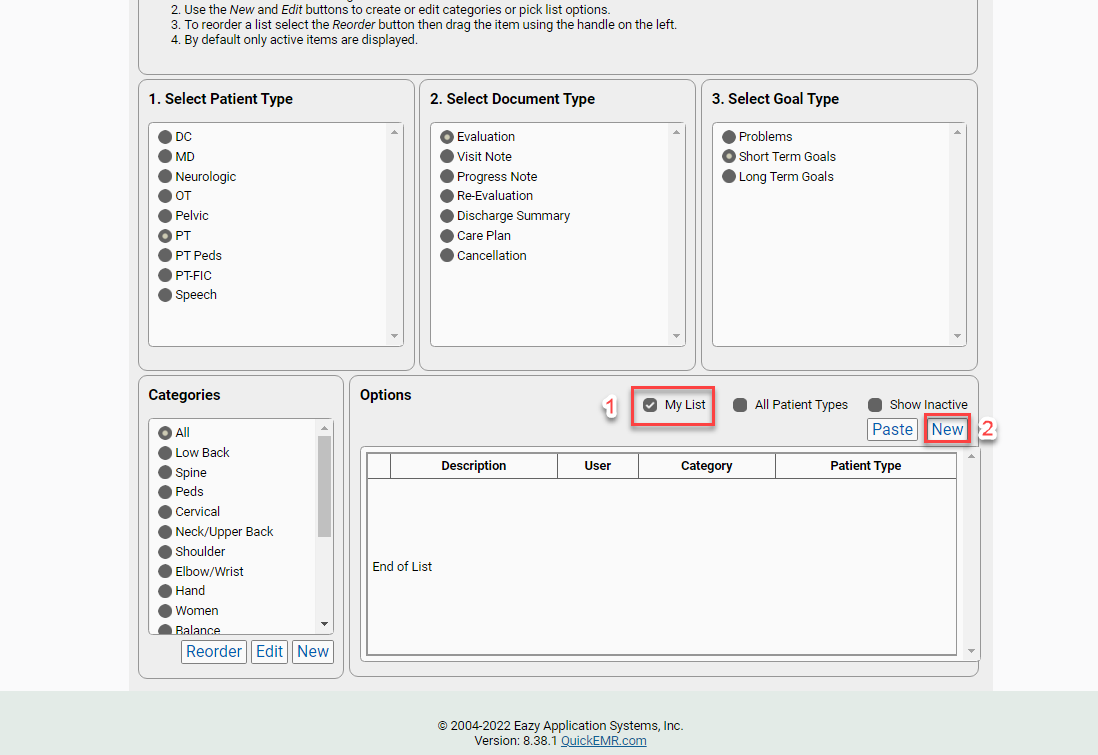
*Super Users will have access to all user's picklist options
1. Check mark "My List"
2. Click New
2. Click New
1. Assign a User
Related Articles
Manage Note Detail Choices (Picklist)
Therapist Notes: Accessing the Picklist 1. Select the pen/paper icon on a note within the Details tab to access the picklist 2. The Picklist interface will appear Once in the Picklist A. Click on "New Option" for a shortcut to add new text options to ...Goal Templates
Therapist Notes: Accessing Goal Templates 1. Navigate to the Problems/Goals tab 2. Click Load Template under goals Template menu will display 1. Select Template 2.Select Entries (click the top check box to select/deselect all ...Customize Note Details (Creating a Patient Type and Note Templates)
Therapist Notes: Note Details Layout Managing Note Details: Where to go? 1. The note details can be managed under Documentation->Customize Note Details Setting up the Patient Type 1. Click create or or edit to update an existing patient type 2. ...Who can complete a note?
In QuickEMR signatures are applied as soon as a note is marked complete. So only the signing provider may mark a note complete. There are two scenarios to keep track of. Cosigner If the note has a cosigner, only the cosigner may mark it complete as ...Objective Measurement (Test/Measure Set up)
Creating New Test and Measurements (objective current): Where to go? 1. The objective measurements can be managed under Documentation->Test/Measurement Setup Step 1: Create or Edit a Category 1. Click add to create a new category or click edit to ...