Searching for Cases by Insurance (Report)
Accessing the report: Where to go?
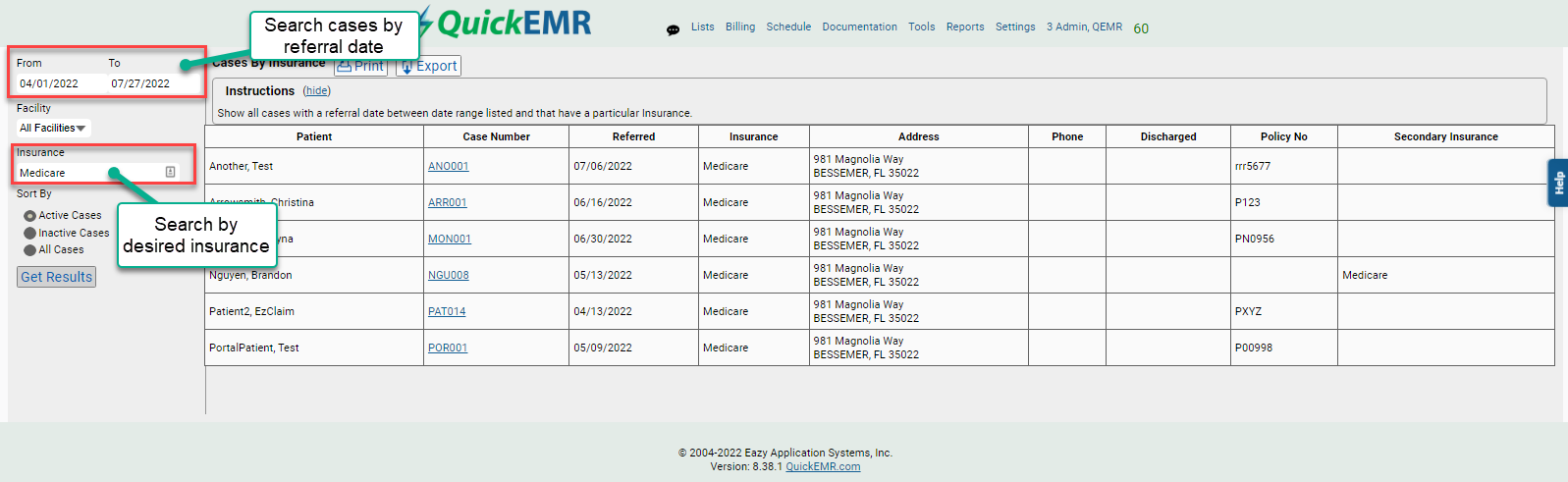
1. This can be found under Reports->Insurance->Cases By Insurance
Cases by Insurance Report
Related Articles
Script Fulfilled Report
The Script Fulfilled Report will generate a list of all patient Scripts within a specific date range, including the amount of prescribed visits and whether that script was met. Where to go 1. The Script Fulfilled Report can be found by navigating to ...ODG Report
ODG (Official Disability Guidelines) is a clinical guideline system commonly used in workers’ compensation cases to help determine the recommended number of visits and treatment duration needed for optimal patient outcomes. ODG provides ...Auth/Scripts Due (Report)
Where to go? 1. This can be found under Reports->Insurance->Auth/Scripts Due Auth/Script Due Report *This report will display ALL active authorization that are less than or equal to the amount specified for the filter amount, "Visits left" despite ...FWC Vital Stats Report
Where to go 1. This can be found under Reports --> General --> FWC Vital Stats. FWC Vital Stats 1. Enter the Referral Date range or check the box for "All Dates" to see all patients generate within the report. 2. Enter any other parameters, such as ...Ready for Review Report
This report will generate all cases within the given date range that are assigned "Ready for Review" and are not yet marked as complete. Therapist Notes: Marking a Notes as "Ready for Review" 1. A note can be marked at the top of the note for ...