Manage or Create a Insurance
*A insurance must be created in the system before adding the insurance to the patient's chart.
Patient's Chart:
Creating a New Insurance: Where to go?
1. Users may manage their insurances under List->Insurance Companies.
2. Once under Insurance Companies, click create to add the Insurance or make inactive
Insurance Settings:
1. Type up the necessary information needed for the insurance and click Save.
A. If the fee schedule is not set up, your charges will not display within qemr. Please visit our Fee Schedule article to set this up.
Insurance Billing:
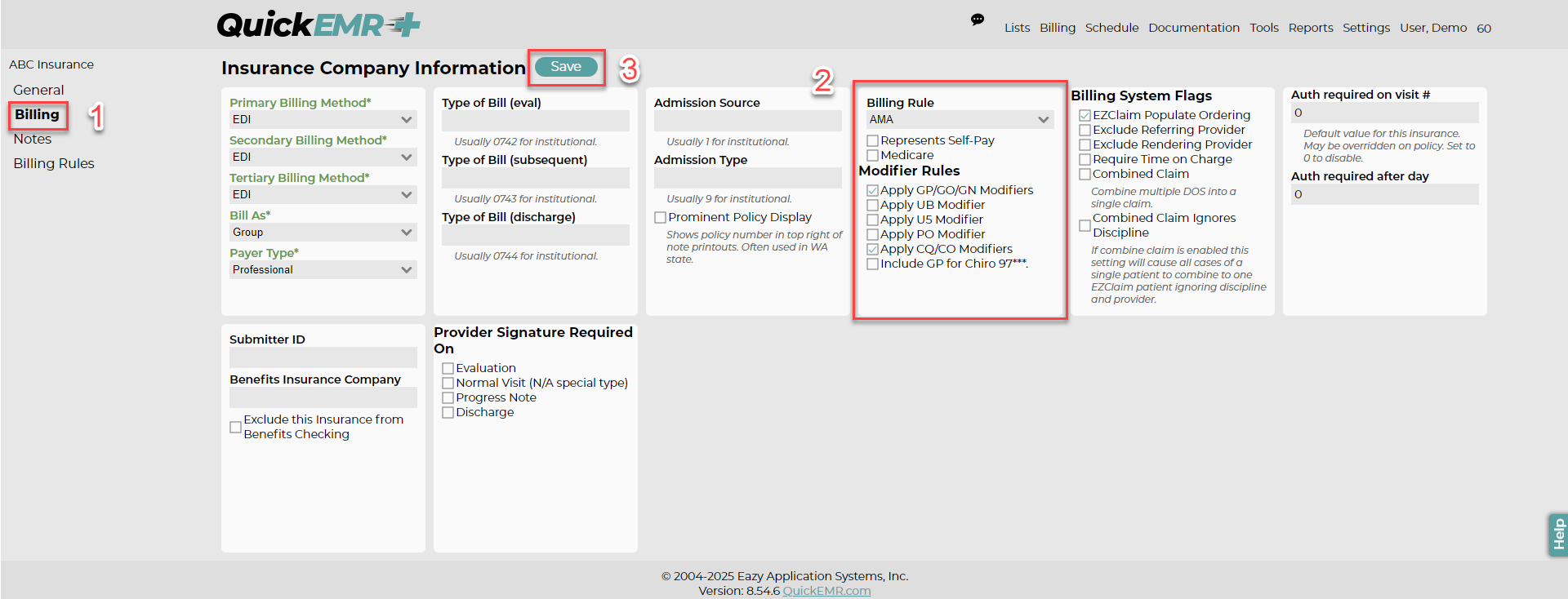
Once saved, new tabs will open on the left
1. Locate the Billing tab
2. Select the appropriate modifiers and billing rule. These will automatically be applied when charges are being inputted.
1. Locate the Billing tab
2. Select the appropriate modifiers and billing rule. These will automatically be applied when charges are being inputted.
Related Articles
Manage or Create a Schedule Template
Before creating a template, a Facility and at least 1 Therapist will need to be added. After creating your template, visit our Schedule Article for additional help The purpose of the Template is to create a outline for the schedule that reoccurs ...Creating a Self Pay/Private Pay "Insurance"
Insurance List: Where to go? 1. Users will need to navigate through List->Insurance Companies. 2. Once under Insurance Companies, Click create to add Self Pay Insurance Settings 1. Input a name such as "Self Pay" so that users are able to distinguish ...Manage or Create a User/Account (Assigning a co-signer, provider signature, complete notes, etc)
When you first log into your new system, you will have a single Admin User, which those credentials should have been sent to you in your initial Welcome email. This article will show you where to navigate to change the Admin user's information and ...User Permissions
Addresses, Address Notes, Address Groups: The Address permissions control the users ability to view, edit, delete, and print/export address information that is found at Lists --> Addresses and address groups found at List --> Misc --> Address Groups. ...Fee Schedule
Fee Schedules are one of the more powerful features in QuickEMR. They allow the user to define the charges for each service/procedure based on date and insurance. This article covers the process of generating a fee schedule and how information is ...