Billing Provider
Introduction
In healthcare, medical billing serves as a crucial process that ensures the financial health of medical practices and facilitates smooth transactions between patients, healthcare providers, and insurance companies. One key component in this process is the role of the "Billing Provider." This term, previously often referred to by the "Tax ID" in medical billing systems, has evolved to emphasize the provider's pivotal role in the billing and payment cycle.
What is a Billing Provider?
A billing provider refers to the entity or individual responsible for receiving payments from payers, such as Medicare, Medicaid, and private insurance companies, for medical services rendered. This can be a healthcare practitioner, a group practice, or a hospital. The billing provider is typically the legal entity that owns the medical practice or the individual under whose name the practice is credentialed with insurance payers.
Understanding the Implementation of Billing Providers on Professional (1500) and Institutional Claims (UB04, 1450)
Medical billing in the United States typically involves two primary types of claim forms: the CMS-1500 and the UB-04. Each form caters to different types of healthcare providers and services. Here's how the "Billing Provider" is implemented in these forms:
Professional Claims (CMS-1500)
For professional claims, the CMS-1500 form is utilized. This form is designed for healthcare providers who bill for professional services, including physicians, nurse practitioners, and physical therapists. The billing provider's information on the CMS-1500 includes:
- Box 33: This box is designated for the billing provider’s name, address, and phone number. It’s essential for ensuring that payments and correspondence from the payer are directed to the correct location.
- Box 33a: This includes the National Provider Identifier (NPI) of the billing provider. The NPI is a unique identification number for covered health care providers.
The information must accurately represent the legal entity or individual entitled to receive payment for the services rendered.
Institutional Claims (UB-04, CMS-1450)
The UB-04 form, also known as CMS-1450, is primarily used by hospitals, nursing facilities, and other institutional providers. The implementation of the billing provider on the UB-04 includes:
- Field 1: This field is for the name and address of the billing provider. It’s the primary identifier on the claim for where services were provided and who is billing for these services.
- Field 56: This is where the NPI of the billing provider is entered.
- Field 57: This field is for other identifiers, like the TIN or EIN
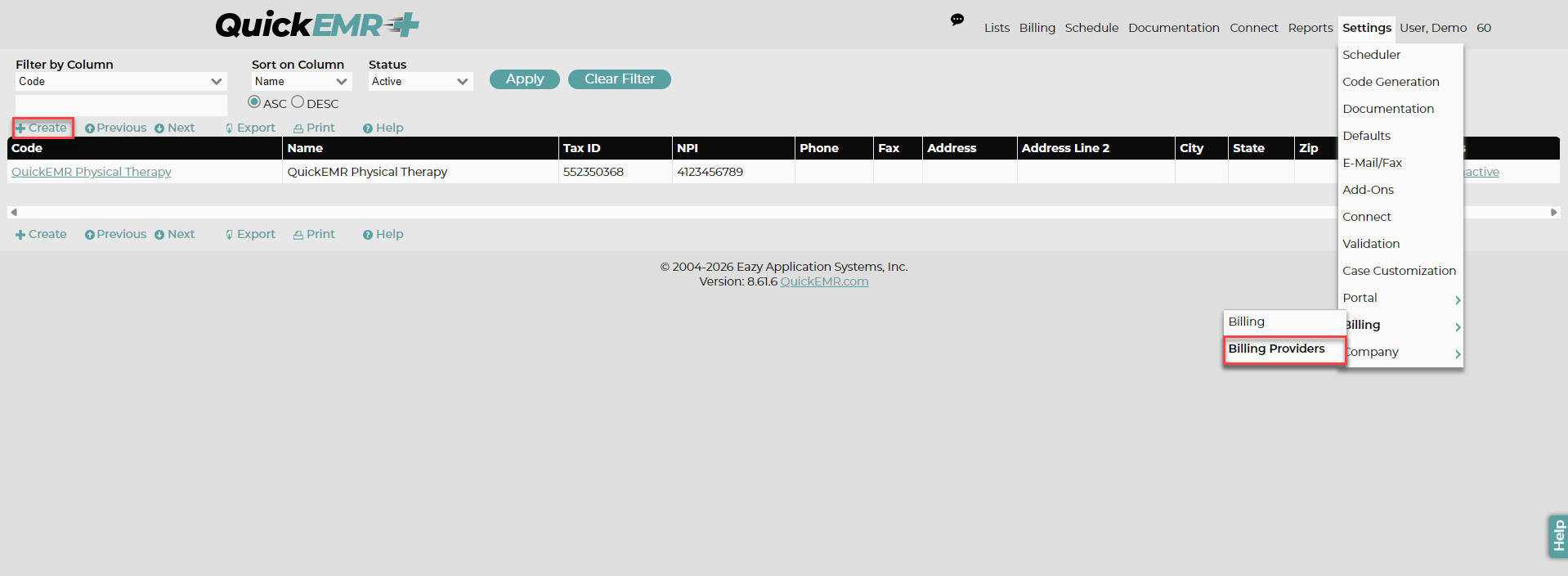
Managing the Billing Provider List: Where to go?
Mapping from QuickEMR to EZclaim
Related Articles
Manage or Create a User/Account (Assigning a co-signer, provider signature, complete notes, etc)
When you first log into your new system, you will have a single Admin User, which those credentials should have been sent to you in your initial Welcome email. This article will show you where to navigate to change the Admin user's information and ...QuickEMR System Initial Set Up
Welcome to QuickEMR! When you first log in to QuickEMR, your system starts as a clean, blank slate. This allows you full control over how your system is configured from the beginning. You’ll need to enter your practice’s core information—such as ...How to Add/Edit your Facility Information
Where to find Facilities list When you navigate to the Facilities page for the first time, you will see that there is a stand-in fake Facility listed as "Acme Rehab". You will want to first choose that facility, and change all of the information to ...User Permissions
Addresses, Address Notes, Address Groups: The Address permissions control the users ability to view, edit, delete, and print/export address information that is found at Lists --> Addresses and address groups found at List --> Misc --> Address Groups. ...Manage or Create a Insurance
*A insurance must be created in the system before adding the insurance to the patient's chart. Patient's Chart: Creating a New Insurance: Where to go? 1. Users may manage their insurances under List->Insurance Companies. 2. Once under Insurance ...